INDHOLDSFORTEGNELSE
Features
OpenAPI: Flexible Item PATCH via SKU
OpenAPI integrations can now update items via SKU using the same two PATCH variants that were previously only available through the product ID.
Fields-only patch: Updates only the fields included in the request without overwriting or resetting other fields (such as reorder flags, customs tariffs, packaging units, or allowed location areas).
Full-update patch: Executes a full item update cycle based on the SKU.
Improved error handling: If an item number (SKU) does not exist for a given item owner, a clear Not Found error message is now returned instead of a generic system error.
Backward compatibility: The existing SKU patch endpoint continues to work unchanged but is now marked as deprecated in the OpenAPI documentation.
Webshipper: Pickup Address Now Based on the Shipping Warehouse
PeakWMS now automatically transfers the address of the warehouse where the order was picked as a separate pickup address (pickup address / collection point) when creating shipments in Webshipper.
For businesses operating multiple physical warehouses, this ensures that PeakWMS sends the correct warehouse information to Webshipper for parcel collection, even if the sender address printed on the label (for example, the headquarters or webshop address) is different.
Configuration: Requires the warehouse postal address to be entered under Warehouse Administration. The sender address remains unchanged.
Tools: Warehouse Layout Design Update
This release includes an update to the warehouse layout design in Tools. The warehouse layout has been modernized while retaining the same functionality as before. The visual appearance of the warehouse layout has been updated, while the colors used to indicate locations and statuses in picking, goods receipt, and other workflows remain unchanged.
Other Updates
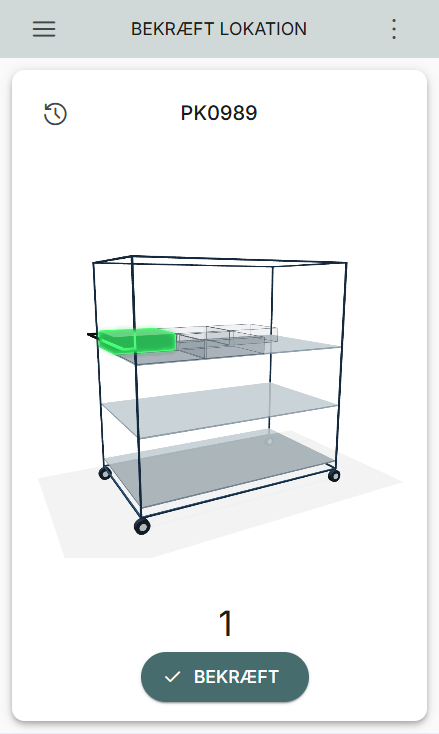
Picking: Highlighted Containers on the Picking Cart Are Now Easier to See
Based on requests from multiple customers, we have updated the appearance of the picking cart once again. We received feedback that it could be difficult to identify which container to pick into, especially when colors were assigned to the container types used on the cart.
The appearance has therefore been adjusted so that containers placed on the cart appear transparent with a grey tint when they are not the active pick destination. Only the container that should be picked into is highlighted in green.
Note: If colors have been configured for your container types, the active container will instead be highlighted using the selected container type color.
In addition, adjusting the picking cart's orientation on the screen has been made faster, so it is no longer necessary to drag the cart multiple times to rotate it.
3PL: Product and Item Owner Information in Received Quantities
Product information and item owner data have been added to the Received Quantities dialog, making it easier to identify which quantities have been received for specific item numbers and item owners.
Products: History for Product Updates Retrieved Through Nightly Synchronization
The nightly product synchronization from webshop and ERP integrations now creates product history entries in the Data Warehouse whenever an item update actually changes values in PeakWMS. Updates made in external systems overnight are now accurately tracked in the product history.
If unchanged items are resent, for example during a full catalog import, they are automatically ignored to prevent unnecessary history entries.
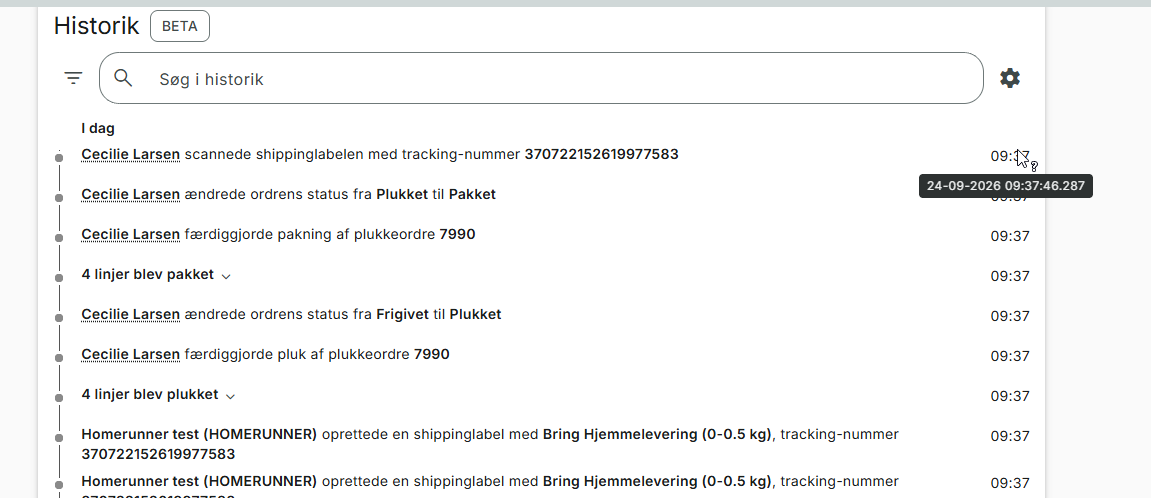
Order History: Exact Timestamp on Hover
When hovering over a timestamp in the order history, the exact time, including seconds, is now displayed.
Bug Fixes
Orders: User Information Recorded for Manual Order Retrieval
When orders are retrieved manually, the user performing the action is now assigned to the transaction. As a result, the user's name will appear in the audit information for both the order retrieval and the creation of order lines.
Single-Piece Orders: Improved Handling of Cancelled Orders on Picking Carts
When packing single-piece orders from a cart that contains both active and cancelled orders, cancelled items will no longer be automatically removed in the background without notification.
Customs Documents: Consistent Customs Value Calculation
We have standardized the calculation of customs values for items without a sales price, such as free gifts, samples, or items with a 100% discount. The value shown on the generated customs document now always matches the electronic customs information sent to the carrier. This reduces the risk of discrepancies and delays during customs clearance.
Packing: Clearer Error Message for Pick Discrepancies
A more informative error message is now displayed in Packing when there is a discrepancy between the pick order line and the quantity that has been picked and is systemically available in the container.
Packing: Scanning Parking Labels After Parking Orders
When parking orders picked on a picking cart using virtual picking bins, it was previously not possible to scan the parking label during the packing process after parking the order. This has now been fixed and is possible both on the initial scan and after cancelling the order selection during packing.
Homerunner: More Robust Label Handling During Package Splits
We have fixed an issue in the Homerunner integration that occurred when a pick order was split into multiple packages at the packing station. If a label that needed to be replaced was missing a shipment number, PeakWMS previously attempted to send an invalid cancellation request to Homerunner.
OpenAPI: Correct Translation Count During Pagination
We have fixed an issue in our OpenAPI integration where the total number of item translations decreased on each page when external systems retrieved data in batches using pagination. External systems and integrations now always receive the correct total number of translations across all pages. This ensures more reliable data transfers and aligns the behaviour with our other API functions.
Procurement Requirements: Correct Total Price Calculation When Changing Supplier
We have fixed an issue in Procurement Requirements where the total price either disappeared or incorrectly displayed "Different Currencies" when changing the supplier or packaging unit on an item line.
Login: QR Codes in Login Token Label Templates
Due to an issue, it was not possible to insert a QR code into label templates created for login tokens. As a result, new login token label templates could not be created. This issue has now been resolved.
ERP: Duplicate ERP Adjustments During Zero Pick Handling
We have fixed an issue where confirming a zero pick in Zero Pick Handling incorrectly sent an additional inventory adjustment (loss) to the ERP integration for a loss that had already been reported during picking.
Inventory adjustments are now synchronized correctly across all connected systems, including ERP, webshop, and POS. When confirming a quantity of zero, no unnecessary messages are sent, and if found stock is registered during cycle counting, only the net difference is sent as a positive adjustment.
Var denne artikel nyttig?
Fantastisk!
Tak for din feedback
Beklager, at vi ikke var nyttige
Tak for din feedback
Feedback sendt
Vi sætter pris på din indsats og vil forsøge at rette artiklen